

The resume contact information section is small but important in making a positive first impression with employers. It should contain your full name, phone number, and email; in some cases, listing your location and social media or portfolio links can also strengthen your job application.
Providing clear and accurate contact details also makes it easy for employers to reach out to you. So, learn how to polish this section in our guide; we will cover everything you need to know, including how to format this part and avoid some mistakes that could cost you an interview.
Key Takeaways
Your resume layout for a Contact Information section should generally feature your full name, phone number, email, location, and social media or portfolio links.
When formatting, make sure that your Contact Information section is at the top, your name is slightly larger, and the rest of the text is as compact as possible.
Avoiding clashing or low-contrast colors, decorative fonts, and non-standard icons can strengthen this section of your resume.
You should also avoid listing your current company email and communications apps.
Using a functional or minimalist resume template can help focus the hiring managers’ attention on your content.
What Is Included in Resume Contact Information?

A resume’s Contact Information section includes your:
#1. Full Name
Your full name should appear at the top of your resume and stand out from the rest of the text with a different resume font size and color.
Use your real name as it appears on official documents, as resumes will sometimes be used for background checks or hiring papers. It is best to leave out nicknames, titles, and honorifics (e.g., Mr., Ms., Mrs.) to keep this part of your resume header clean.
Also, you shouldn’t overload your name with degrees or certifications unless it strengthens your candidacy for a specific role. For example, in a nurse resume, it is helpful to include RN next to your name.
Below are good examples of what this portion of your resume should look like:
Full Name Examples
Evangelina Grace Harrison
Benjamin James Anderson, RN
And here are a few bad examples:
Bad Examples
Benjamin “Tech Guru” James
Mrs. Eva Gracey
Abigail Marie MBA, BBA, IELTS 8.0
#2. Phone Number
Next, you will want to include your phone number on the resume. This allows employers to contact you quickly for interviews or follow-up questions, so make sure it is active and accurate.
Using a clean and consistent format with spacing or a dash after every three numbers makes your phone number easier to read. You can also make the dialing codes clear by putting them in parentheses. Refer to these examples:
Good examples | Bad examples |
(415) 555 2671 | 4155552671 |
212-555-0187 | 2-12-55501-87 |
#3. Email
Your email address is one of the most important parts of your resume’s Contact Information section, as it is often the primary way employers reach out for interviews, follow-ups, or next steps.
You should use an email address that’s professional and based on your name to avoid any confusion. If you don’t already have a separate one for work, create it to stay organized and avoid missing important messages.
Here are a few examples of professional emails for resumes:
Email Examples
abigailclarke@gmail.com
benjamin.james.anderson@gmail.com
You should avoid emails like these, as they can create a negative first impression that can be difficult to recover from:
Bad Examples
cutebunny1212@gmail.com
partytechking888@gmail.com
#4. Address/Location
Your address or location shows employers where you are based and whether you are within commuting distance. However, you don’t need to specify all the details; in most cases, listing your city and country is enough. For example, "Phoenix, Arizona.”
Just saying, “USA” or “America” would be too vague if employers want to assess if you can overlap working hours in remote roles, or it might be redundant if the job description calls for U.S.-based candidates only.
If you are applying for jobs in a different state, you should clarify your relocation plans, as this prevents employers from assuming you are unavailable. For instance, you can write “Currently based in Nebraska, relocating to California.”
#5. Social Media, Professional Profile, or Portfolio
Links to your online profiles and portfolio can strengthen your resume when they showcase your experience and expertise.
For example, including your LinkedIn in the resume’s personal details section can give hiring managers quick access to your qualifications, endorsements, and professional connections.
Tip: Customize your LinkedIn URL to remove the default string of numbers and characters, so it looks clean and credible.
If you work in design, writing, marketing, coding, or similar fields, a portfolio link in your resume provides direct proof of your skills. It is also valuable when you are making a career change and want to communicate your competencies through personal projects.
Electronic portfolios are also great for students seeking their first job because they allow employers to see real examples of their qualifications and work and give them a way to stand out in a competitive digital job market.
Ensure any links you include can be accessed without errors, restricted permissions, or extra steps; broken links make you look unprofessional and unprepared.
Good examples | Bad examples |
linkedin.com/in/abigailmarieclark | linkedin.com/in/abigailmarieclark8473921a |
behance.net/evangelinadesigns | https://www.behance.net/evangelinadesigns2020?tracking_source=search_users_recommended%7Cevangelina |
How to Format Resume Contact Information
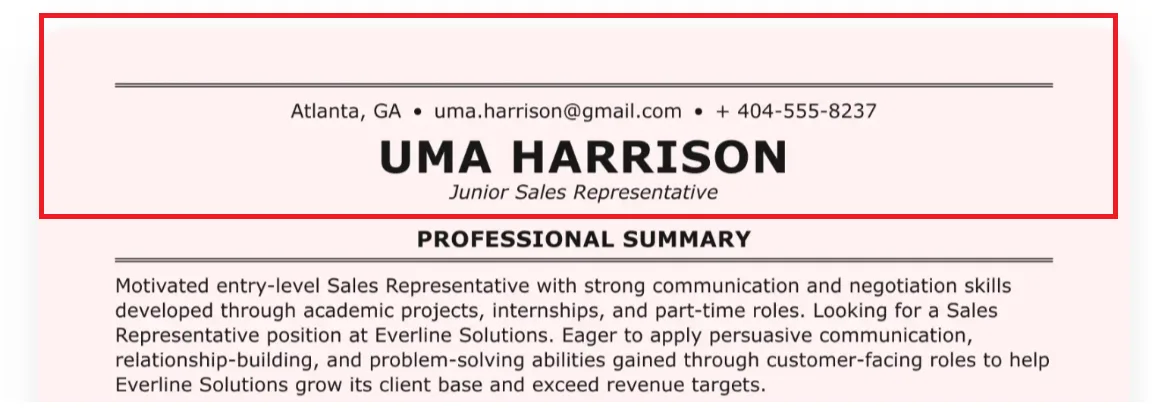
Here are some tips to format your Contact Information on a resume clearly and professionally:
Contact Information Formatting Tips
Place it at the top with balanced margins. Your Contact Information should be above your Summary section and be immediately visible and readable. Keep it within standard resume margins, typically 0.5 to 1 inch on all sides. You shouldn’t push the text too close to the edges to ensure your resume looks polished and print-friendly.
Apply visual hierarchy. You can do this by increasing your name’s font size by 2 to 4 points compared to the body text, centering it, and surrounding it with whitespace. This helps organize the content of your resume to follow natural eye movements.
Keep it compact. You don’t want the Contact Information section to take up too much of your resume, so try to format your phone number, email, and location on one line. You can use separators to keep them distinct, but make sure to stick to one style; don’t mix commas, slashes, and symbols.
Use our resume builder. We can help you apply clean, consistent formatting automatically and provide live previews for you to double-check every digit and test every hyperlink. You can choose from our collection of functional resume templates and review resume examples to see how strong candidates structure their contact details.
5 Common Mistakes to Avoid When Adding Contact Information
To ensure your Contact Information section makes it effortless for employers to reach you, be aware of these five common mistakes:
Common Mistakes
Using colors that clash or are low-contrast. For example, hot pink on a blue background and gray on a beige background. These reduce the visibility and accessibility of your resume, so it is best to stick to color combinations like black and white.
Using decorative fonts. It is tempting to use cursive, custom fonts for your contact information section to help it stand out from the rest of the resume. However, these are difficult to skim. You should use a simple resume font like Arial, Calibri, Times New Roman, or Cambria.
Using non-standard icons. To save space, it is common for resumes to include icons to indicate your personal details (e.g., the phone icon instead of writing out “phone number:”). But these must be instantly recognizable. Hiring managers spend only a few seconds on a resume; don’t make them waste it on guessing what your icons represent.
Listing your current company email. Even if it is convenient, it looks unprofessional and can raise concerns about confidentiality and judgment. You may also lose access to that account after leaving the company, so you should use a separate address based on your name. Follow our guidelines above to ensure it is professional.
Including irrelevant communication apps. Listing WhatsApp, Telegram, Snapchat, or other messaging apps in your contact section can look informal unless the job specifically requires it. You should stick to your standard phone number unless instructed otherwise.
Complete Your Resume With Seamless Contact Information
Resume.co can help you pull everything together professionally!Closing Thoughts
Your resume’s Contact Information section may seem like a small one, but it is incredibly important. After all, if employers can’t contact you, you may miss out on the opportunity to move into the next steps of the hiring process, so it is important to complete this section with care. Remember, clean contact details show attention to detail and set the tone for the rest of your application!
Resume Contact Information FAQs
#1. Should you have contact details on a CV?
You should have your contact details on a CV; without them, employers won’t be able to reach you for interviews or next steps. Your CV should include the essential components we have outlined above, too.
#2. Should I use my personal email on a resume?
You should use your personal email on a resume, but make sure that it is professional. Using your current company’s email can raise concerns about confidentiality and your judgment. If you want, you can create a separate email for job applications.
#3. Is it okay to add social media links to my resume?
It is okay to add social media links to your resume if it is relevant to the job you are applying to and can strengthen your candidacy. For example, if your target role is a Social Media Manager, then employers can review your content strategy, visual branding, and engagement metrics by looking at your social media links.