

You can enable “Open to work” on LinkedIn by clicking Open to on your Profile or Preferences > Open to work under the Jobs tab. This feature signals that you are looking for new opportunities and can be shown publicly or only to recruiters.
Once enabled, LinkedIn also allows you to set specific job preferences, including roles, locations, and employment types. This way, recruiters can find you more easily.
Follow along as we explain the process step by step, answer common questions, and share practical tips to help you make the most of LinkedIn’s job search tools.
Key Takeaways
“Open to work” is a feature that indicates you are looking for new job opportunities; you can enable it to be seen by everyone or reserve it for recruiters’ eyes only.
You can enable this feature from your Profile or the Jobs page on a desktop or a mobile device.
Once you turn “Open to work” on, LinkedIn allows you to set your specific job preferences for roles, locations, employment types, and more.
This job-search setting can help increase your visibility to recruiters, provide more personalized job recommendations, and encourage support from your network.
To further optimize your profile while enabling this feature, you should write a strong headline and About section, as well as invest effort in networking.
Make recruiters chase you on Linked
- 10 game-changing fixes
- 25+ expert tips that give you an extra edge
- Personalized to your target role
- Based on insights from 40+ recruiters
- Optimized for LinkedIn search algorithms
What Does “Open to Work” Mean on LinkedIn?
"Open to work" is a LinkedIn job-search setting you can use to let others know that you are looking for new professional opportunities. When you enable it, you can specify your desired job titles, roles, employment types, locations, and work arrangements. LinkedIn then uses these details to match you with relevant job openings.
This means you can attract opportunities directly through the platform’s search and recommendation system instead of relying only on applications. Moreover, recruiters often filter for candidates who have marked themselves as “Open to work,” so using this feature can increase your chances of being noticed and contacted.
LinkedIn offers two “Open to work” visibility options:
Recruiter-only. Only recruiters can see your “Open to work” status. This is useful if you are currently employed and prefer a more discreet job search.
Public. Everyone can see a green “#Opentowork” frame on your profile photo. It is suitable if you want to increase your exposure to recruiters while also encouraging your network to support you through referrals and recommendations.
How to Enable the “Open to Work” Feature on LinkedIn
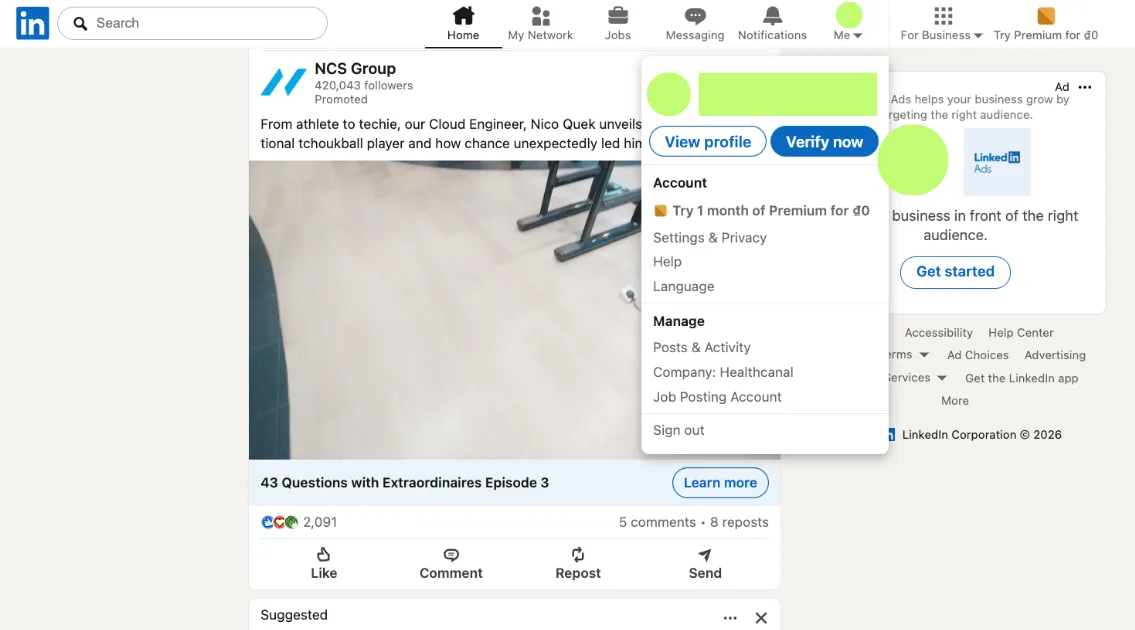
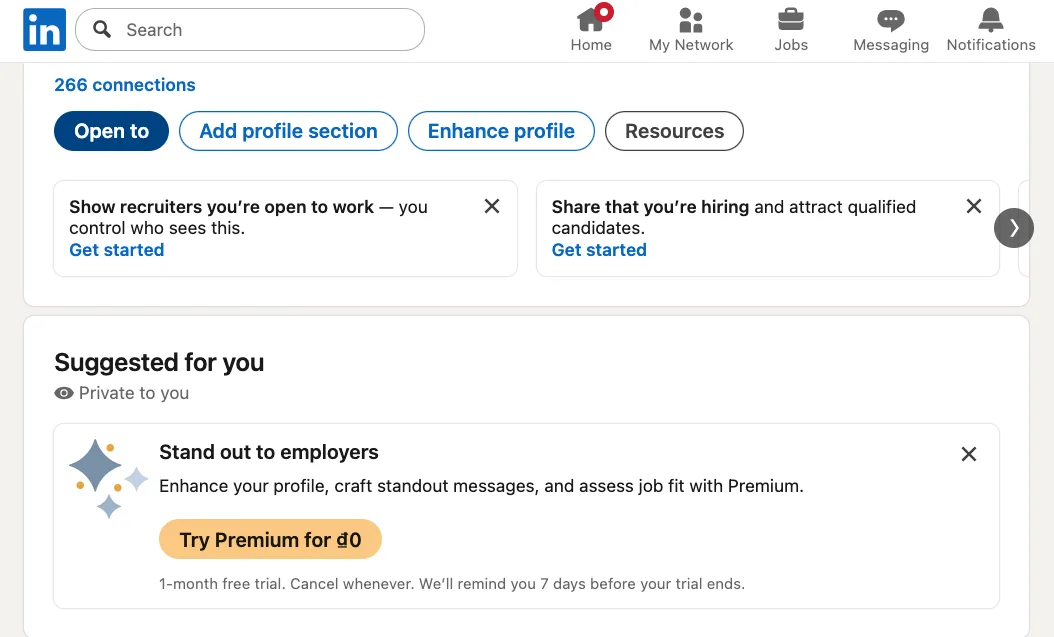
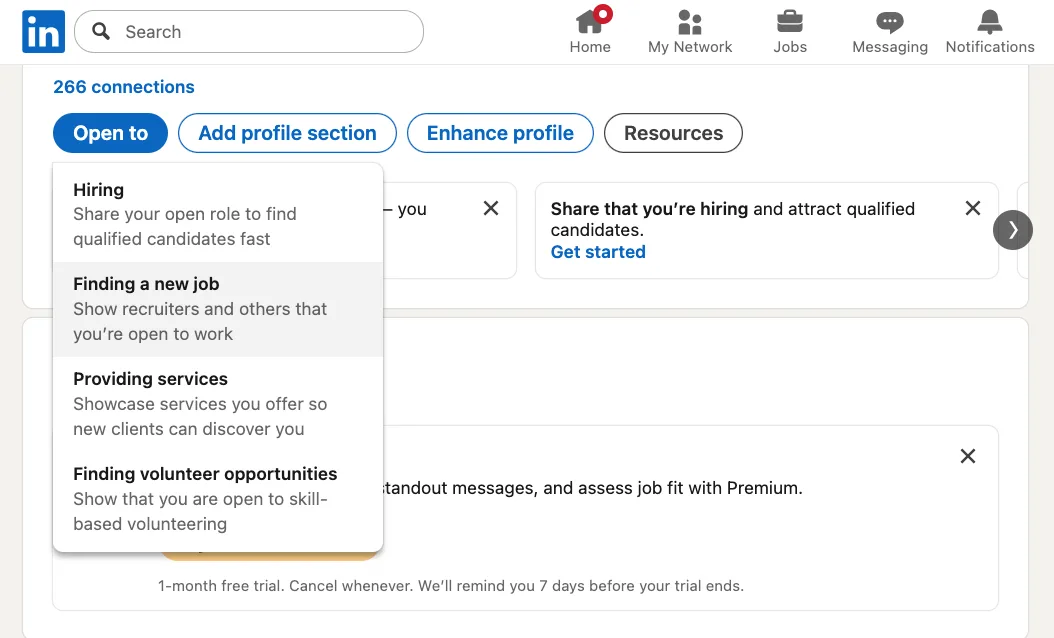
Here is a step-by-step guide on how to enable “Open to work” on LinkedIn:
Click Me at the top of your page and then View Profile.
Click the Open to blue button.
Select Finding a new job from the dropdown options.
Complete the required fields based on your preferences.
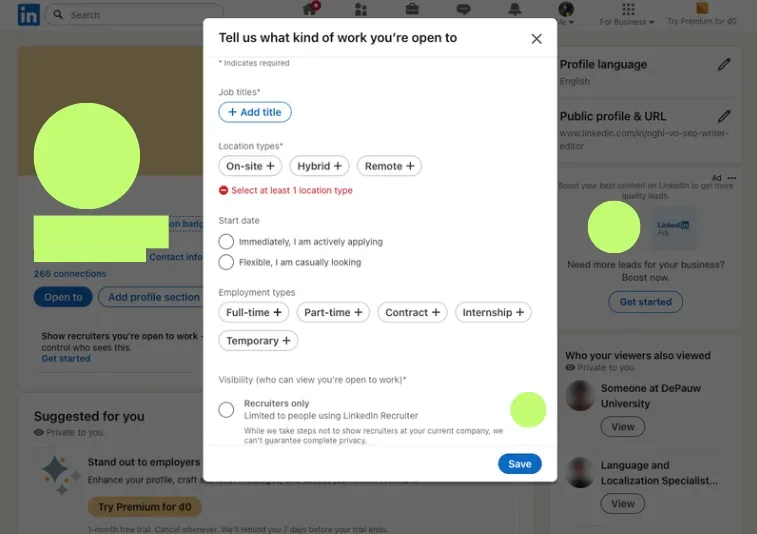
Press Save.
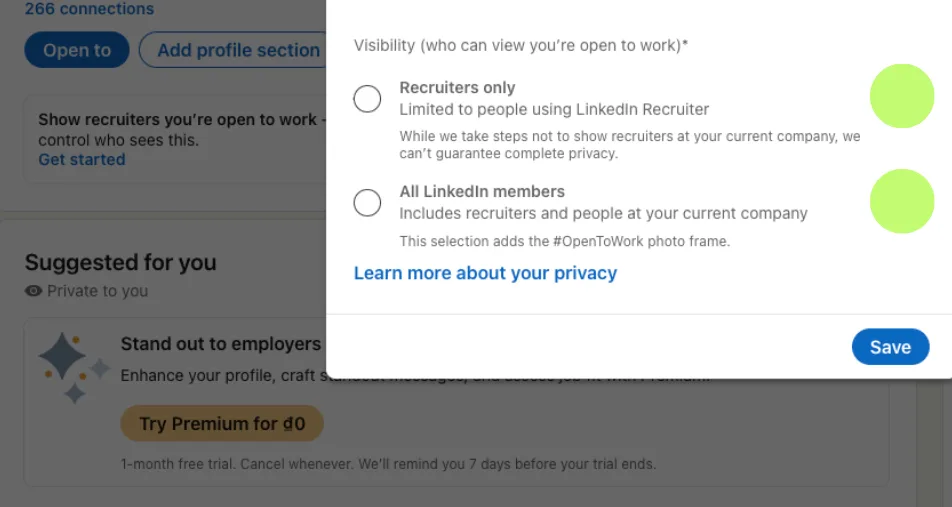
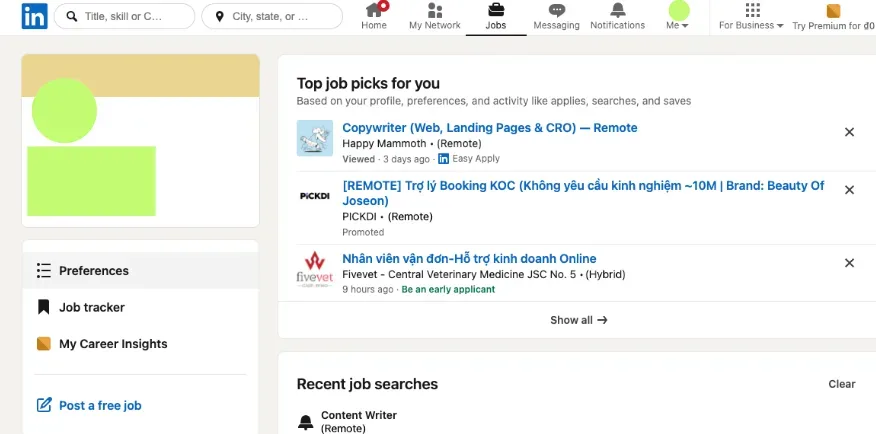
Alternatively, you can follow the steps below to enable the feature from your Jobs tab:
Click Jobs at the top of your page and then Preferences on the left panel.
Click the arrow next to Open to work under the My interests heading.
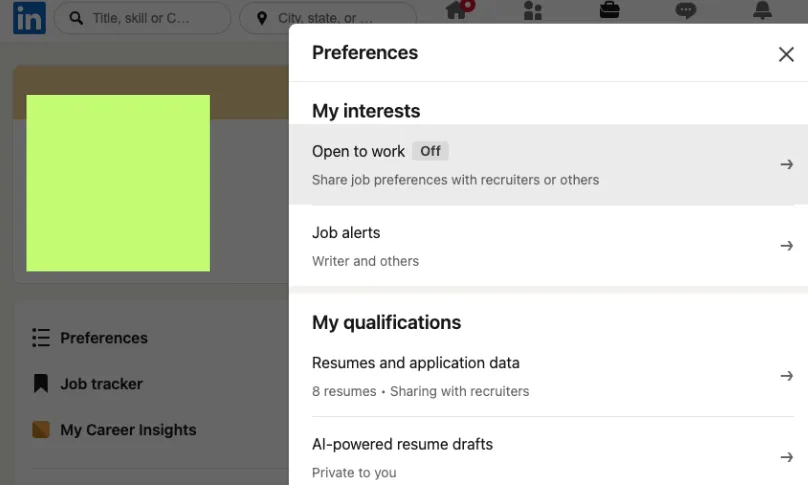
Fill in your job preferences and select Save once you are done.
Note: If you are on a mobile device, Preferences should be at the top of your screen, rather than on the left side.
How to Customize Your Preference
You can customize your preferences by selecting the options available under each category. Here are the main areas you can adjust:
Desired job titles and roles. You can click +Add title and type in the positions you are targeting; for example, “Marketing Specialist” or “Data Analyst.”
Location types. You can choose how you want to work by selecting one or more options: on-site, hybrid, or remote.
Locations. Specify where you want to work by typing directly into the Add location field. This way, LinkedIn can suggest opportunities in your preferred countries, cities, or regions. It also allows recruiters to find you for roles based in those locations.
Start date. Select “Immediately, I am actively applying” or “Flexible, I am casually looking” to help others understand your timeline.
Employment types. Your options are full-time, part-time, contract, internship, or temporary. LinkedIn allows you to select multiple types depending on what opportunities you want to be considered for.
Visibility. Decide who can see your “Open to work” status by selecting Recruiters only or All LinkedIn members. If you choose Recruiters only, note that LinkedIn cannot guarantee complete privacy from your current company.
Don’t forget to click Save when you are done to make sure your preferences are updated.
3 Benefits of Using the “Open to Work” Feature on LinkedIn
If you are searching for a job on LinkedIn, the “Open To Work” feature offers the following benefits:
#1. Increased Visibility to Recruiters
According to LinkedIn’s internal data, turning on “Open to work” doubles your chances of getting a message from a recruiter.
The feature can help your profile get noticed by employers in two important ways. First, it tells LinkedIn what kinds of roles you are looking for. When you select preferences like job titles, locations, or work arrangements, LinkedIn surfaces your profile more often to recruiters searching for candidates in those categories.
Second, it signals to recruiters on LinkedIn that you are interested in new opportunities. This matters because employers are not only looking for qualified candidates, but they are also looking for those ready to engage in the hiring process. Seeing that you are “Open to work” can make them more likely to reach out.
With more than 243 million members in the U.S. alone, increasing your LinkedIn profile visibility can directly affect how often opportunities come to you rather than the other way around.
#2. More Personalized Job Recommendations
Aside from increasing your profile visibility, enabling “Open to work” helps the platform tailor job suggestions to what you are looking for.
After you set your preferred roles, locations, and work arrangements, LinkedIn uses those details to recommend more relevant openings. This makes your search more efficient, as you won't have to spend a lot of time scrolling through unrelated postings.
Tip: To ensure you are notified whenever new positions matching your preferences are posted, pair "Open to work" with the "LinkedIn Job Alerts" feature.
#3. Stronger Support From Your Network
If you choose the public visibility option, “Open to work” can serve as a quiet prompt for others to offer support. Your connections may be more likely to share relevant openings, introduce you to hiring managers, or refer you for roles at their companies.
Many roles are filled through personal networks before they ever reach public job boards, and even a simple message from a peer can open doors that online applications can’t. So, by making your job search visible, you increase the chances of receiving help from people who already know your strengths and want to see you succeed.
Common Questions & Troubleshooting
While LinkedIn’s “Open to work” feature is simple to set up, you may still have some questions or run into small issues. Here are some situations that may need solutions:
You can’t see the “Open to work” option. This may be because you are using an outdated version of the platform. You should try updating the LinkedIn app, refreshing your browser, or switching to a different device. If the option still does not appear, log out and log back in, or clear your browser cache.
You want to hide the “Open to work” status. If you want to make your job search less visible, you can adjust your visibility settings anytime. Go to your profile, click the Open to section, and edit your preferences. From there, you can switch from All LinkedIn members to Recruiters only, or disable “Open to work” on LinkedIn completely.
You’re not getting recruiters’ messages. Even with “Open to work” enabled, outreach is not guaranteed. Your profile may need stronger keywords, clearer job titles, or updated experience to match recruiter searches. Expanding your network and staying active on the platform per LinkedIn’s rules can also improve your visibility in search results.
Ready to create a professional resume?
Use our resume builder to design yours in minutes.3 Tips on How to Optimize Your Profile While “Open to Work”

Here are three LinkedIn profile tips to keep in mind:
#1. Write an Eye-Catching Headline
Your headline is one of the first things recruiters scan, and it plays a major role in search visibility. A clear headline highlights your career goals and helps your profile appear in more relevant recruiter searches while you are open to new opportunities.
Feel free to check out our LinkedIn headline examples to see how small changes can make your profile stronger and more searchable!
#2. Strengthen Your About Section
When recruiters click into your profile, they want quick context on what you do best. Use your About section to showcase your personal brand, skills, achievements, and the industries you have experience in. Keeping this section keyword-rich also makes it easier for recruiters to connect your profile to their needs.
#3. Build Your Network
Besides LinkedIn profile optimization, you should also focus on networking while you are open to new opportunities. The “Open to work” feature can help recruiters find you, but building LinkedIn relationships may lead to job leads that never reach public postings.
You can consider joining groups related to your role or industry and attending virtual or local networking events, where you can meet hiring managers and expand your connections beyond your immediate circle.
On a day-to-day level, small interactions matter. Commenting thoughtfully on other people’s posts, congratulating connections on new roles, or sharing helpful resources can keep you visible in a natural way. When combined with “Open to work,” networking can make your job search more proactive, personal, and effective.
Want More Tips to Get Noticed by Recruiters?
Check out our LinkedIn Profile Optimization page!Closing Thoughts
Now that you know how to enable “Open to work” on LinkedIn, you can start using this feature to support your job search.
Setting clear job preferences and choosing the right visibility option may help recruiters find you faster and connect you with roles that match your goals. Pair it with a strong profile and consistent LinkedIn networking efforts, and you will be in a better position to take advantage of new opportunities as they arise.
Also, because a well-structured resume reinforces your LinkedIn profile and helps recruiters quickly see your value, don't forget to create a polished, tailored one with our AI-powered resume builder's help!
How to Enable “Open to Work” on LinkedIn FAQs
#1. How long should I keep “Open to work” active?
You should keep “Open to work” active for as long as you are actively searching. If you are applying regularly and open to recruiter outreach, leaving it on can help maintain visibility. Once you pause your search, you can turn the feature off or update your preferences.
#2. Does “Open to work” improve job prospects?
“Open to work” may improve job prospects by increasing visibility and signaling interest to recruiters. It helps your profile appear in more relevant searches and shows that you are available for new roles. That said, it works best when paired with a strong profile.
#3. Will my current employer see my status?
Your current employer will not automatically see your "Open to work" status if you choose the Recruiter Only visibility option. However, LinkedIn notes that it cannot guarantee complete privacy in every case, particularly if recruiters at your company are active on the platform.
Make recruiters chase you on Linked
- 10 game-changing fixes
- 25+ expert tips that give you an extra edge
- Personalized to your target role
- Based on insights from 40+ recruiters
- Optimized for LinkedIn search algorithms