

The Dean’s List on a resume is an academic honor that demonstrates a student’s academic success during a particular semester. This honor is awarded to students with a high GPA, so its inclusion on a resume can signal to potential employers that you’re reliable and hardworking.
In this article, we will show you how to include the Dean’s List on a resume, which sections are appropriate for this, and how to avoid common mistakes. We’ll also provide a resume example to demonstrate our advice in practice.
Key Takeaways
A Dean’s List is an academic honor for university students who achieve a GPA of 3.5 or higher, though the exact requirements vary by school.
You can add the Dean’s List to your resume objective, education section, or a dedicated honors and awards section.
To correctly format the Dean’s List on a resume, you should be specific, concise, and include GPA and relevant semesters.
Common mistakes when adding the Dean’s List to your resume include incorrect capitalization, wrong achievement placement, and adding it when it’s redundant.
What’s a Dean’s List, and Should You Add It to Your Resume?
A Dean’s List is an academic honor awarded to university students with the highest GPAs: typically, between 3.5 and 4.0. In addition, these students must attend the university full-time, which means they often need at least 12 credits to qualify.
In some schools, the requirements are even stricter, so the GPA cutoff is 3.7 instead of 3.5. Regardless, the list is updated each semester, meaning that someone who made it in the fall may not be on the Dean’s List in spring.
Students on the Dean’s List don’t receive any particular reward, aside from the right to include it as an academic honor when writing a resume. This can give their applications a meaningful edge, especially in the sea of similar resumes and achievements. After all, a study by Clemson University has shown that one of the factors that affects recruiters’ perception is academic achievement, which encompasses GPAs and honors.
Here are some reasons to include the Dean’s List on your resume:
It highlights your academic performance and demonstrates to your employer that you’re hard-working and ambitious. This is particularly important for entry-level positions, as you don’t have much or any work experience to back you up.
It proves your consistency, especially if you’ve achieved it several times in a row. As a result, your potential employer might consider you reliable, which is always a desirable quality in an employee.
It strengthens your resume. At the beginning of your career, you likely won’t have much content to add to your application, so any achievement or experience is welcome.
Dean’s List Resume Example
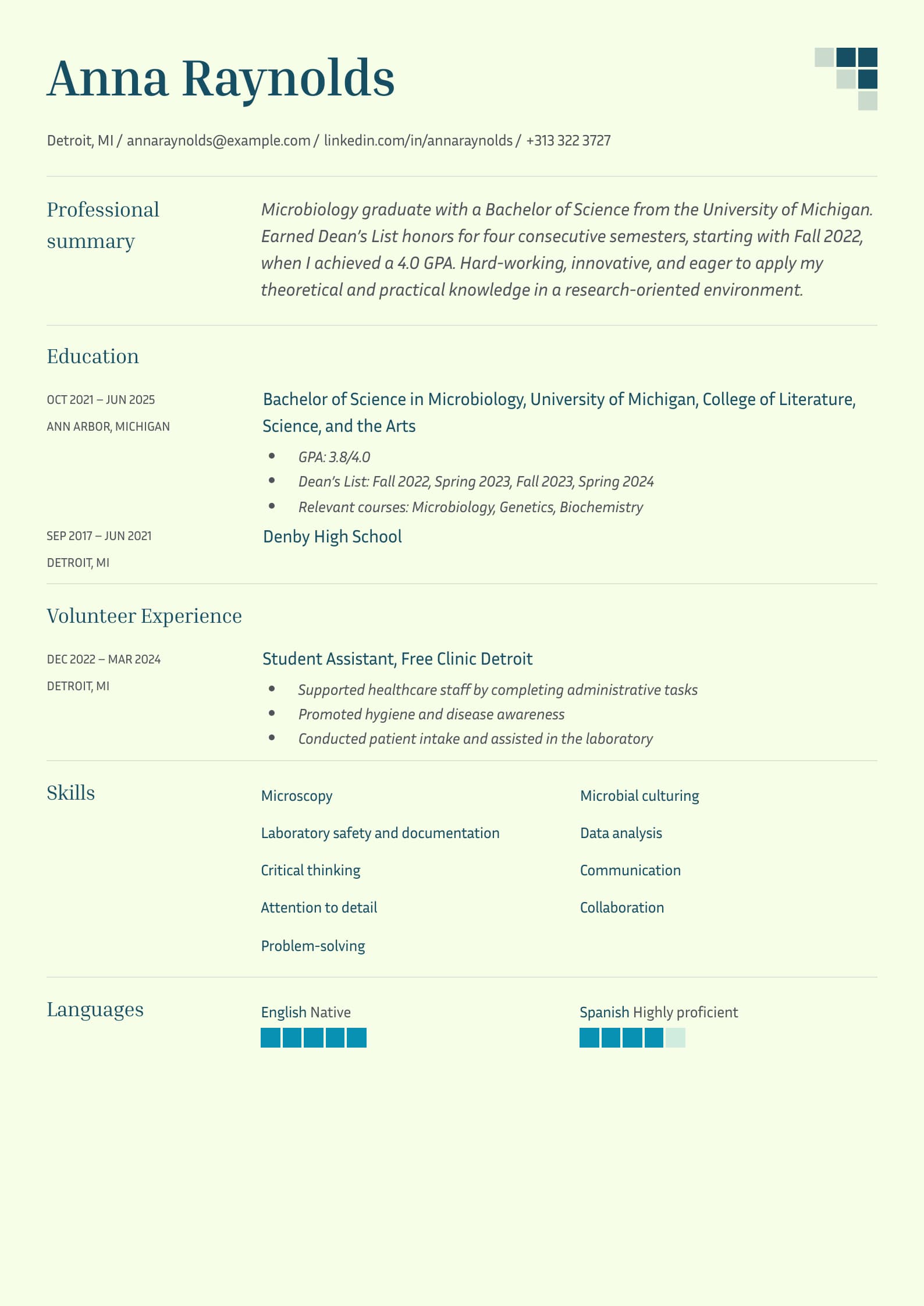
Now that we’ve established what the Dean’s List is, let’s take a look at a recent graduate resume example that demonstrates how to include it properly:
Where to Put Dean’s List on Your Resume: 3 Potential Sections

You can put the Dean’s List on your resume in three potential sections: resume objective, education section, or honors and awards section. Below, we’ll show you how to do this effectively for each option.
#1. Resume Objective
A resume objective is a short section of 2–3 lines placed at the top of the document, which summarizes the main points of your resume and outlines your career goals. Essentially, it provides the first glimpse into who you are as a professional and motivates the recruiters to keep reading.
Resume objectives have to be short but impactful, so they often highlight key achievements and honors. That’s why they are the perfect spot for your Dean’s List accomplishment, especially if you have no relevant professional achievements.
Here’s what that might look like:
“Highly motivated professional with a Bachelor of Mechanical Engineering from the University of Illinois. Made the Dean’s List in six consecutive semesters, reaching a GPA of 3.8 in Spring 2023. Seeking to leverage my problem-solving skills and knowledge of mechanics in a position that will help me grow and gain new experiences.”
#2. Education Section
The main section on your resume for the Dean’s List achievement is the education section, where you should list all your academic experiences and accomplishments. Due to its importance on a graduate or student resume, it is usually placed at the top, right under the personal statement or objective.
Here’s how you can include the Dean’s List in the resume education section:
Education
Bachelor of Mechanical Engineering University of Illinois, Chicago, IL October 2020–June 2024
GPA: 3.7/4.0
Dean’s List: Fall 2021, Spring 2022, Fall 2022, Spring 2023, Fall 2023, Spring 2024
Relevant courses: Engineering Dynamics, Fluid Mechanics, Mechanical Engineering Design
#3. Honors & Awards Section
Although adding your Dean’s List award to your resume education section is sufficient, you might want to highlight this achievement more by putting it in a designated honors and awards section. However, only do so if you have other accomplishments to include; there’s no need for a whole separate section for just one achievement.
This section is pretty simple to write; just list your accomplishments as bullet points, including the details you consider relevant.
Here’s what honors and awards on a resume may look like:
Honors and Awards
Dean’s List: Fall 2022, Spring 2023, Fall 2023, Spring 2024. University of California, San Diego
Academic Excellence Scholarship, University of California, San Diego
Undergraduate Research Recognition Award, Department of Microbiology, University of California, San Diego
How to List Dean’s List on a Resume
Here are a few concrete tips for listing the Dean’s List on a resume effectively:
Be specific. Don’t simply write “Dean’s List” in your achievements and leave it at that; instead, list the semesters you won this recognition. If you’ve done it consecutively, you can simply put the number of semesters in brackets to shorten the bullet point. However, even then, we recommend listing them individually.
Include GPA when relevant. You can add your GPA next to the semesters you’ve made it to the Dean’s List if it’s particularly high. For example, a 4.0 GPA is always worth mentioning.
Be concise. The Dean’s List achievement shouldn’t take up more than a line or two on your resume. In other words, list the most relevant information and don’t delve into any unnecessary details.
Know when to remove it. There’s no need to keep the Dean’s List on your resume when you gain sufficient professional experience, as it won’t be as relevant as other information. Remember to update your resume frequently to avoid redundancies.
3 Common Mistakes to Avoid When Adding Dean’s List on a Resume
Here are the three common resume mistakes to avoid when adding the Dean’s List on a resume:
Inconsistent capitalization. Both “D” and “L” should always be capitalized in Dean’s List; any other variations are incorrect. However, it’s even worse when you’re inconsistent in how you write the name of this honor, as your resume may appear messy and highly unprofessional.
Including it for only one semester. This is acceptable if you’ve attended a highly prestigious school, but otherwise, you want the Dean’s List to demonstrate consistently high performance over several semesters. So, you should only include it if you’ve achieved it two or more times during your student years.
Misplacing the achievement. Some students mistakenly include the Dean’s List in their extracurricular activities section, which can confuse recruiters. Remember, the Dean’s List should only be added to the education section or, alternatively, the designated awards and honors section.
Add Dean’s List to Your Resume With Ease
Create a perfect graduate resume with our resume builder.Closing Thoughts
Putting the Dean’s List on your CV or resume can be immensely helpful at the beginning of your career, when academic achievements will make up the bulk of your resume. As we have shown, this can set you apart from other candidates, as it demonstrates your consistency and hard work.
If you need some help to include the Dean’s List on your resume, our resume builder with professional resume templates is an excellent choice. As long as you enter the required information, it can practically add it for you. Also, you can use our resume examples to see how it’s done.
Dean’s List on Resume FAQs
#1. Can I include the Dean’s List if I graduated years ago?
Yes, you can include the Dean’s List if you graduated years ago, but there’s no need to, especially if you’ve gained professional experience in the meantime. The more you have, the less focus should be put on your educational achievements; instead, you should emphasize workplace ones. However, career changers can put this honor back on their resume to highlight their diligence and hard work.
#2. Is a 3.5 GPA a Dean’s List?
A 3.5 GPA is the cutoff for the Dean’s List in most universities, though some raise it to 3.7. Make sure to check the requirements for your specific institution if you want to work toward it.
#3. How many semesters of the Dean’s List should I mention?
You should mention all semesters of the Dean’s List on your resume, especially if you’ve attended a prestigious university with high standards. If you’ve made it consistently, you can simply write “Dean’s List (4 semesters); otherwise, you should specify (Dean’s List, Fall 2024, Spring 2025).