

To review an AI-written resume, compare every claim with your actual experience before polishing the language. Check dates, job titles, tools, responsibilities, and results; restore relevant details that disappeared; then read the summary, skills, and work history together. Finally, inspect the document you will submit, including the downloaded file.
The hardest mistake to catch is often a plausible addition. “Created a checklist” becomes “improved accuracy.” “Helped new colleagues” becomes “managed a team.” Both rewrites sound professional, but they describe different work.
This guide gives you a practical review process, a complete fictional example, and a real editing example from Resume.co. You can use the same checks on text from any AI writing tool. The aim is a resume whose wording you understand and whose claims you can explain in an interview.
Key takeaways
Compare AI wording with a reliable source record before polishing its style.
Check implied results and responsibility levels, not only dates and numbers.
Restore useful omissions and carry corrections across Summary, Experience, and Skills.
Our real Resume.co example preserved the template count but added an unsupported improvement claim.
Inspect the corrected preview and downloaded file; an AI reply alone does not confirm the final document.
Why the review needs more than proofreading
Resume.co's Q3 2025 interviews with paying users described three reasons for editing AI text: removing skills the person did not have, restoring information a rewrite had removed, and making the wording sound like something they would say. Interviews with former subscribers conducted from October 2025 through February 2026 also described generating a draft and then rewriting it in their own words. Separately, our analysis of custom writing instructions recorded requests to correct attributed experience and years of experience.
These observations explain why the review below covers accuracy, missing information, and voice separately. A sentence can be grammatically polished and still need work in any of those areas.
Start with a source of truth
Keep your original resume or a separate career record beside the generated draft. Include exact employment dates and titles, qualifications, tools you used, and notes about what you personally did. An old resume can contain mistakes too: check uncertain details against your own records.
For each sentence, ask three questions:
What fact supports this? Identify the task, record, project, or result behind the wording.
Does the wording change that fact? Look for stronger responsibility, a broader skill, or an implied outcome.
Is anything important missing? Compare in both directions: draft against source, then source against draft.
Mark each claim keep, correct, or verify. Keep accurate wording that helps the reader. Correct a claim when you know the right version. Verify something you cannot currently support, and leave it out of the submitted resume until you can.
You do not need to publish the records behind every bullet. You do need to know where the information came from.
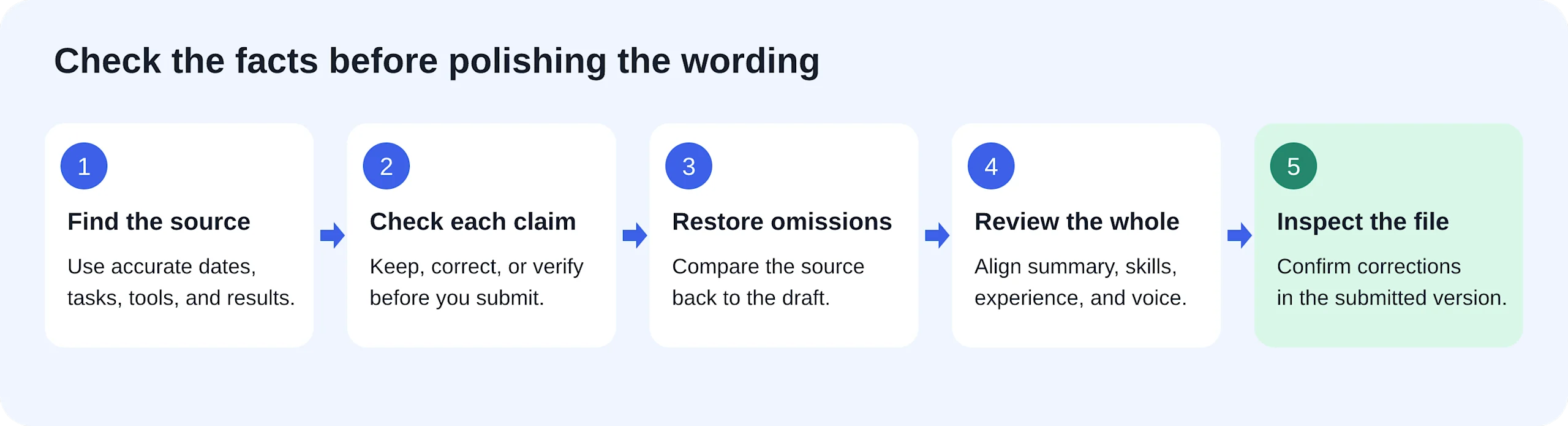
Compare in both directions: the draft against your source, then your source against the draft. This diagram is an editorial guide, not a product screenshot.
Review facts before tone
Dates and years of experience
Check each role's month and year, including whether it is still current. Then compare the timeline with any “X years of experience” claim in the summary.
Two overlapping jobs do not automatically add up to that many calendar years. A three-year support role and a two-year administrative role that overlap for one year span four calendar years. They also do not establish five years specifically in customer support.
If a total would need a complicated explanation, describe the relevant work directly and let the dated entries show the timeline. Preserve part-time, internship, volunteer, and contract labels where they explain the experience accurately.
Responsibilities and results
Read the verbs closely. “Supported,” “coordinated,” “owned,” and “managed” imply different levels of responsibility. Choose the verb that matches your role, even when another sounds more impressive.
Check outcome phrases too: “improving efficiency,” “reducing errors,” and “increasing satisfaction” are claims about an effect. Removing an invented percentage is not enough if the remaining sentence still claims an improvement you never established.
Keep verified results when you have them. When you do not, use the activity, scope, and purpose: what you did, for whom, and with which tools. A concrete description does not need a fabricated achievement attached to it.
Skills and qualifications
Trace each skill to something you have actually done or learned. Using Excel to maintain records does not establish advanced macros. Helping colleagues use a checklist does not establish staff management.
Check education and certifications against the correct qualification name, institution, completion status, and date. A planned or unfinished qualification must not become an awarded one through a rewrite.
A complete review example
The following fictional exercise uses a deliberately flawed draft to show how one correction can affect several sections of a resume.
Source facts
Sam Rivera is applying for customer support work. The fictional source record contains:
Contact: sam.rivera@example.com; Denver, Colorado.
Customer Support Associate, Example Home Supply, January 2022–December 2024. Answered 25–35 customer emails per day about deliveries and returns, used a shared inbox, updated returns records in Excel, and created four response templates. No CRM software or measured improvement results were supplied.
Administrative Assistant, Example Community Center, part-time, January 2024–December 2025. Maintained room bookings in Google Calendar, sent weekly confirmation emails, created a room-opening checklist, and showed two volunteers how to use it. Sam did not supervise staff or volunteers.
Education: Associate of Arts, Example Community College, May 2021.
These are the complete facts available for this exercise. No additional awards, certifications, languages, or performance metrics were supplied.
Draft to review
Sam Rivera Denver, Colorado · sam.rivera@example.com
Summary Results-driven customer success leader with five years of experience optimizing customer journeys and leading high-performing teams. Proven track record of reducing response times and delivering seamless service through advanced CRM systems.
Experience
Administrative Assistant — Example Community Center January 2024–Present
Managed a team of two volunteers and streamlined facility operations.
Maintained room bookings and sent confirmation emails.
Customer Support Associate — Example Home Supply January 2022–December 2024
Resolved 35 customer cases daily in Salesforce, improving satisfaction.
Created four response templates that reduced response time by 20%.
Updated returns records in Excel.
Skills Salesforce · Team management · Customer success strategy · Excel
Education Associate of Arts — Example Community College, May 2021
What needs to change, and why
Draft claim or omission | What the source establishes | Editing decision |
|---|---|---|
Five years of customer success leadership | Three years in support; a separate two-year part-time role overlaps for one year | Describe the work directly; remove the total and leadership claim |
Administrative job listed as current | It ended in December 2025 | Restore the end date and part-time label |
Managed two volunteers | Showed two volunteers how to use a checklist | Name the activity; remove team management from Skills too |
Resolved 35 cases daily | Answered 25–35 emails daily | Restore the range and unit; answering an email does not establish resolution of a case |
Salesforce and advanced CRM systems | A shared inbox and Excel | Remove both unsupported tool claims, including in Summary |
Improved satisfaction and reduced response time by 20% | No measured outcomes supplied | Remove the effects; keep four templates |
Checklist and weekly frequency missing | Both are supplied facts | Restore them because they make the administrative work concrete |
Education entry | Matches the source | Keep it unchanged |
Notice that this is more than proofreading. The dates and grammar could look consistent while the document still overstates the candidate's work. Also, deleting Salesforce from Skills would leave the unsupported CRM claim in Summary. A factual correction must travel wherever that fact appears.
Complete corrected version
Sam Rivera Denver, Colorado · sam.rivera@example.com
Summary Customer support professional with experience answering delivery and returns questions, maintaining Excel records, and writing reusable response templates. Additional administrative experience includes room bookings, confirmation emails, and volunteer guidance.
Experience
Administrative Assistant — Example Community Center, part-time January 2024–December 2025
Maintained room bookings in Google Calendar and sent weekly confirmation emails.
Created a room-opening checklist and showed two volunteers how to use it.
Customer Support Associate — Example Home Supply January 2022–December 2024
Answered 25–35 customer emails daily about deliveries and returns through a shared inbox.
Updated returns records in Excel.
Created four reusable customer response templates.
Skills Customer email support · Excel recordkeeping · Response template writing · Google Calendar scheduling
Education Associate of Arts — Example Community College, May 2021
The corrected version keeps the useful specifics: email volume, templates, tools, and volunteer guidance. It restores the missing checklist and accurate timeline. Its stronger evidence comes from clearer facts, not from added seniority or invented results.
What a real correction looked like in Resume.co
In our Resume.co walkthrough, we used Tailor to adapt a fictional candidate's resume for a support vacancy. One source bullet said:
Wrote six reusable email templates for common customer questions.
The product's unedited suggestion was:
Wrote six reusable email templates for common customer support questions, improving response consistency.
The count was preserved, but the final phrase added an effect that the source did not establish. We edited the Suggested work experience field before selecting Apply, returning this bullet to the supplied fact:
Wrote six reusable email templates for common customer questions.
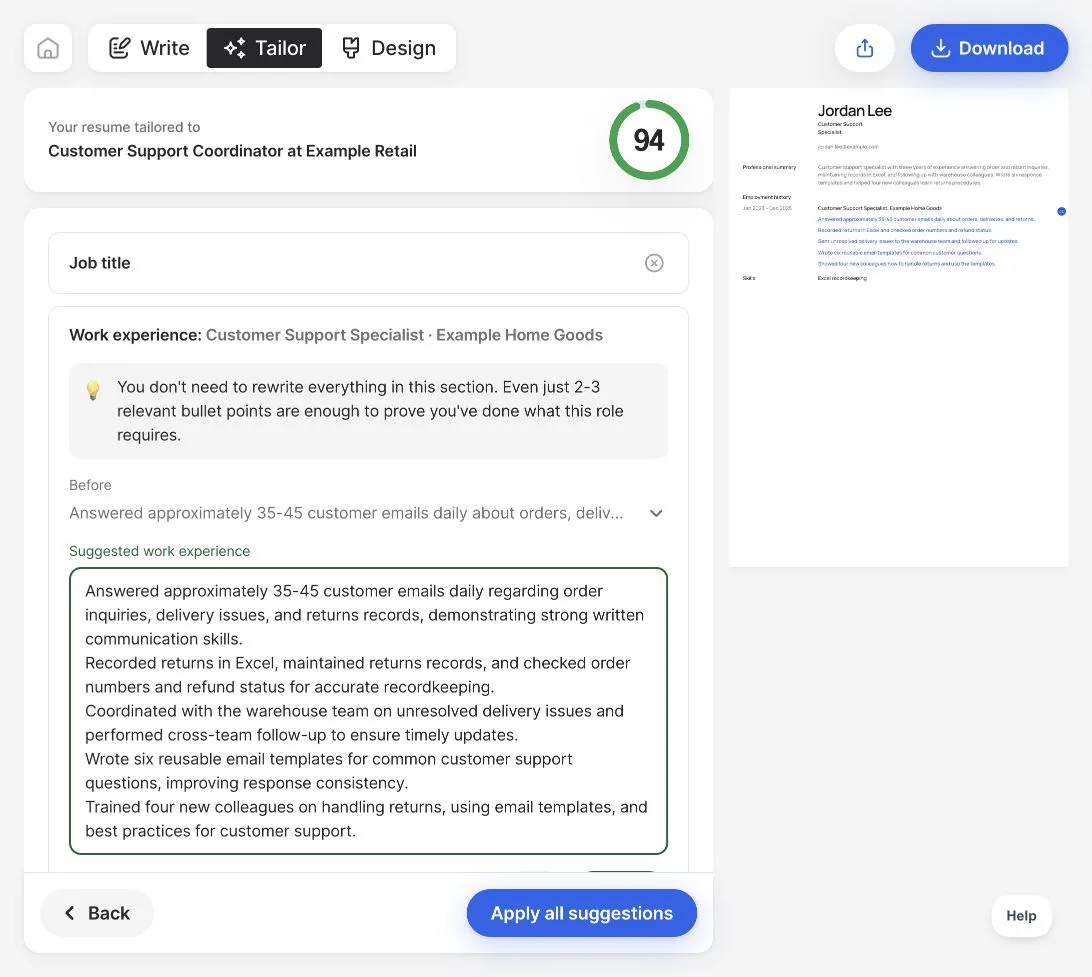
Before review: the generated suggestion adds “improving response consistency.”
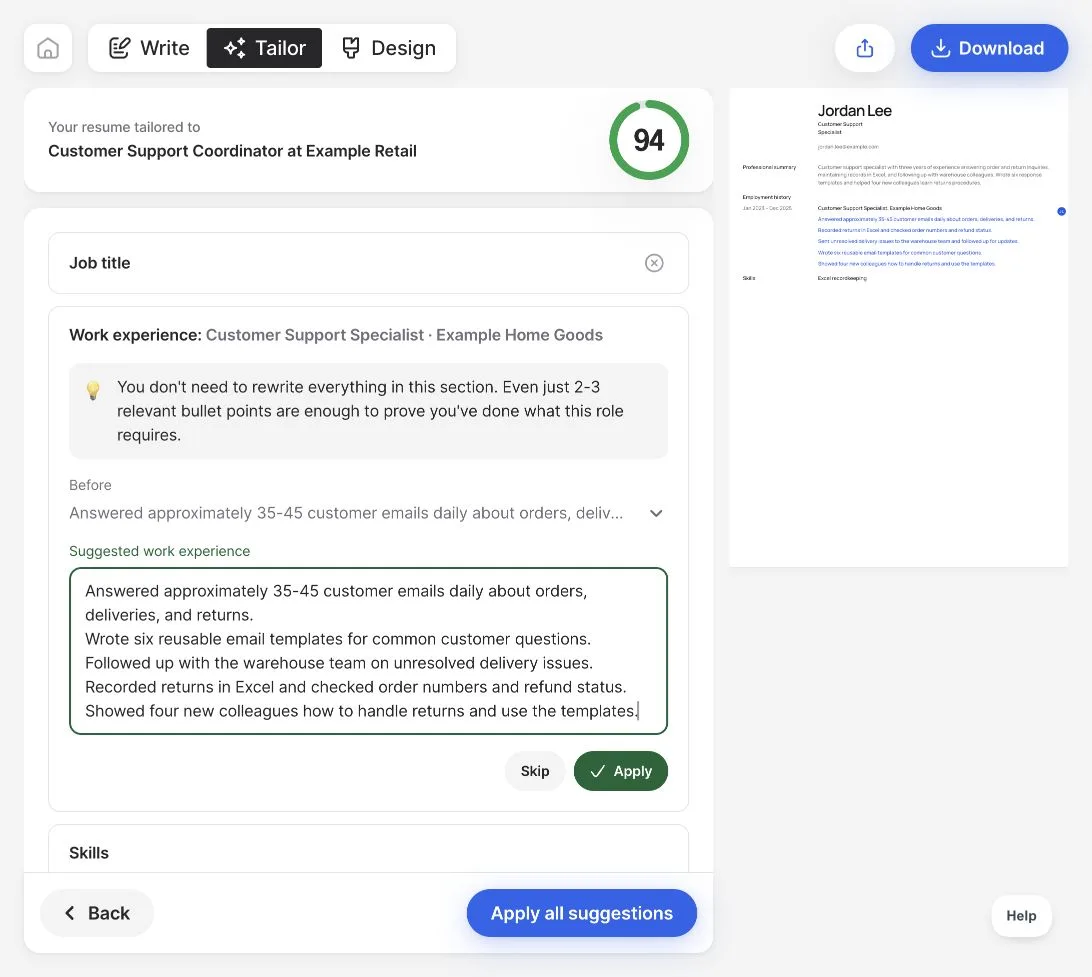
After manual review: the corrected text, ready to apply.
When reviewing a suggestion in Resume.co's resume builder, keep your factual source nearby, edit unsupported wording before applying the suggestion, and check the resulting document. In this walkthrough, the professional summary stayed unchanged, so finishing the suggestion flow did not finish the whole-resume review.
About the examples
Sam Rivera's draft is a constructed teaching example, not AI output. The screenshots show a real Resume.co walkthrough with fictional input, recorded on October 11, 2026 and also used in our tailoring guide; we checked the preview, not an exported file. The interview findings are qualitative observations from selected groups, not estimates of AI error rates or hiring outcomes.
Make the wording sound like you
Once the facts are right, read the text aloud. For each sentence, imagine an interviewer asking, “What did you actually do?” If your answer would be much simpler than the sentence, use that explanation as the basis for a rewrite.
In Sam's teaching example, “optimizing customer journeys” becomes answering delivery and returns questions. “Streamlined facility operations” becomes maintaining bookings and creating a room-opening checklist. These edits give the reader something specific to understand and ask about.
Keep normal terminology for your field when it accurately describes the work. You do not need to make the writing casual or replace every professional term. Remove language that adds no information, and avoid rewriting clear text merely to make it sound different.
An AI writing tool can help with this pass. Supply the facts with a narrow instruction, such as:
Rewrite this paragraph in plain professional English using only the facts below. Preserve the dates, quantities, tools, and my level of responsibility. Do not add outcomes. If a detail needs confirmation, list a question separately instead of adding it to the resume.
Compare the new version with the source again. A second AI rewrite is another draft to review.
Check the whole document and the file you will send
After section-by-section editing, do one final pass across the complete resume:
Consistency: Does Summary describe the same level of experience as Employment History? Does every listed skill have a basis in your background?
Completeness: Did a useful fact disappear? Are qualifications, dates, and any relevant employment labels still present?
Language: Are completed roles in past tense? Are names, spelling conventions, and punctuation consistent? Remove any placeholders or assistant commentary.
Applied changes: Open the resume preview and find the actual corrected text. If you asked a chat assistant to make a change, check the destination section as well as its reply.
Submission file: Download the intended version, open it, and inspect every page for missing text, awkward breaks, and unreadable spacing. Check contact details and links. Follow the employer's requested file format.
Copying text from the downloaded file into a plain-text editor can help reveal missing or reordered content, though it is not a full ATS compatibility test.
Keep the submitted version with the application details so you can return to the same wording when preparing for an interview. Your review is finished when the document contains supported claims, reads clearly, and reflects the corrections you meant to make.