

Put your nursing license and relevant certifications in a clearly labeled section, with the issuing organization, current status, and expiration dates where applicable. Use the credentials after your name as a short introduction, not a substitute for those details. Keep completed qualifications separate from applications, scheduled courses, and credentials you have not yet earned.
This guide focuses on US registered nurse resumes. It shows how to turn a mixed list of qualifications into a readable header, license section, certification section, and education entry. For a full work-history and skills guide, see our nurse resume example.
Key takeaways
Separate earned degrees, nursing licenses, certifications, and course credentials.
Use current records for the issuing body, license status, and expiration dates.
Keep scheduled training visibly separate from qualifications already earned.
In Resume.co, use the built-in Certifications section and rename it when combining licenses and certifications.
Review the preview and downloaded file; resume wording does not verify eligibility to practice.
Why a generic qualifications list is not enough
What prompted this guide: Resume.co's profession-specific research found users creating their own license and certification sections. The accompanying April 2026 survey export contained just three completed responses, all reporting that they had created a custom section, plus two partial responses excluded from that count.
That is a small usability signal, not a survey of the nursing profession. It points to a practical problem: a template may give you somewhere to type, but you still need to decide what each qualification means and where it belongs.
A hiring reader should not have to guess whether “RN, BLS, BSN” means a current license, a completed course, or a degree in progress. Separating the records makes the distinctions visible.
Separate the four kinds of information
Information | Example | Where to put the details |
|---|---|---|
Academic degree | Bachelor of Science in Nursing, BSN | Education: degree, institution, completion date or clearly labeled expected date |
Nursing license | Registered Nurse, RN | Licensure: board or jurisdiction, current status, expiration, and verified license type where relevant |
Specialty certification | An earned nursing specialty credential | Certifications: official name, issuing body, and current dates |
Course completion credential | Basic Life Support, BLS Provider | Certifications and training: exact course/card name, issuer, and expiration shown on the record |
For US practice authorization, follow your board's requirements rather than inferring eligibility from a degree or course. NCSBN's licensure guidance explains that authorization and requirements depend on jurisdiction.
The table is an organizing aid. You can use one Licenses & Certifications section when the list is short. Use separate Licensure and Certifications & Training sections when that makes the different statuses easier to read. The heading matters less than keeping each record complete and unambiguous.
Put the right credentials after your name
ANCC recommends a sequence beginning with the highest earned degree, followed by licensure, applicable state designations, and national certifications; honors and other recognition follow. A straightforward example for a person who has earned the degree and holds the license is:
Avery Lane, BSN, RN
For more complex combinations, use ANCC's credential-display guidance and the credential issuer's approved designation. Do not invent an abbreviation or add letters for an exam you plan to take.
Keep the header readable. It introduces the candidate; the sections below explain who issued each qualification and whether it is current. A BSN in the header does not replace the Education entry, and RN does not tell the reader which board issued the license.
Build a license entry from your current record
Prepare the following information before rewriting the section:
License title: use the actual designation, such as Registered Nurse.
Issuing board or jurisdiction: name the relevant state board, not just “USA.”
Status: copy the current verified status rather than guessing from an old resume.
Expiration: use the date in the record, with consistent month/year formatting where suitable.
License type or privileges: include single-state or multistate wording only when verified and relevant.
Identifier, if requested: follow the employer's application instructions. Keep unnecessary identifiers out of public portfolio examples.
NCSBN describes Nursys as a source for licensure and practice-privilege information from participating jurisdictions. Check the issuing board when appropriate. Verification is a separate task from writing a resume: neither an AI-generated sentence nor a resume score establishes your license status.
If an employer asks for a license number in its application form, provide it there accurately. Do not fabricate a number to make a sample look complete. Our examples deliberately contain no identifiers.
Give certifications their own dates and issuers
For each relevant certification or course credential, write the official name, issuing organization, and current expiration date. Avoid a line such as “CPR, ACLS, other certifications” that leaves the reader to work out what is current and who issued it.
For an AHA course, check the actual course completion card. AHA describes how to verify an eCard and states that its course completion cards are valid for two years through the end of the issue month. Use the date on your own record rather than calculating a replacement from memory. AHA course-card information.
Do not turn a booked class into a completed credential. If the application calls for that information, “ACLS course scheduled for November 2026” is different from “ACLS certified.” A plan to enroll is different again.
A complete before-and-after example
The following candidate and records are fictional. The exercise covers credential-related sections, not a complete nursing resume.
Source facts
Source facts for Avery Lane:
BSN completed at Example College in May 2023.
Active California Registered Nurse license, single-state; the fictional record expires June 2027.
AHA BLS Provider card, expiring August 2027.
ACLS course booked for November 2026; not yet completed.
No specialty nursing certification has been earned.
Before
Avery Lane, RN, BSN, ACLS
Qualifications
RN license, BLS, ACLS, nursing degree.
Licensed to work across the US.
This version creates several different problems. It mixes degrees, licenses, and courses; presents scheduled ACLS training as an earned credential; hides the current BLS date; and claims broader practice authorization than the source supplies.
After
Avery Lane, BSN, RN
Licensure
Registered Nurse (RN), California Board of Registered Nursing.
Active, single-state license. Expires June 2027.
Certifications & Training
Basic Life Support (BLS) Provider, American Heart Association. Expires August 2027.
Education
Bachelor of Science in Nursing, Example College. May 2023.
Upcoming Training
ACLS course scheduled for November 2026; not yet completed.
The Upcoming Training entry is optional: include it when relevant to the application, not as evidence that Avery already meets a current-ACLS requirement. If space is tight, retain the verified current qualifications and explain scheduled training in the appropriate application field.
What changed and why
Change | What it fixes |
|---|---|
BSN precedes RN; ACLS removed from the name line | Distinguishes earned credentials from a future course |
Board, status, license type, and expiration added | Replaces a vague license claim with specific information |
Nationwide practice claim removed | Stays within the supplied single-state record |
BLS issuer and expiration added | Makes the current course credential identifiable |
Scheduled ACLS separated from completed training | Makes the outstanding requirement visible |
No new qualification was added. The stronger result comes from organizing the same facts accurately.
How to add licenses and certifications in Resume.co
In Resume.co's resume builder, use the built-in Certifications section for the license and BLS entries from Avery's example. You do not need a custom section.
Add the built-in section
In the Write workflow, open Additional section and select Certifications. If you are using Reorder sections, choose Add section to reach that menu. Use the pencil beside the section heading to rename it Licenses & Certifications when you are including both.
Create a separate record for each credential
Use Add one more record for the second entry. Here is how Avery's fictional facts map to the fields:
Field | RN license | BLS credential |
|---|---|---|
Name | Registered Nurse (RN) - active, single-state | Basic Life Support (BLS) Provider |
Issuer | California Board of Registered Nursing | American Heart Association |
Expiration date | Jun 2027 | Aug 2027 |
The form has no separate license-status field, so this example includes the verified status and license type in Name. License number and Issue date are left blank because the fictional source does not provide them. For your own resume, use your actual records and the employer's instructions; do not copy the form's placeholder number or date.
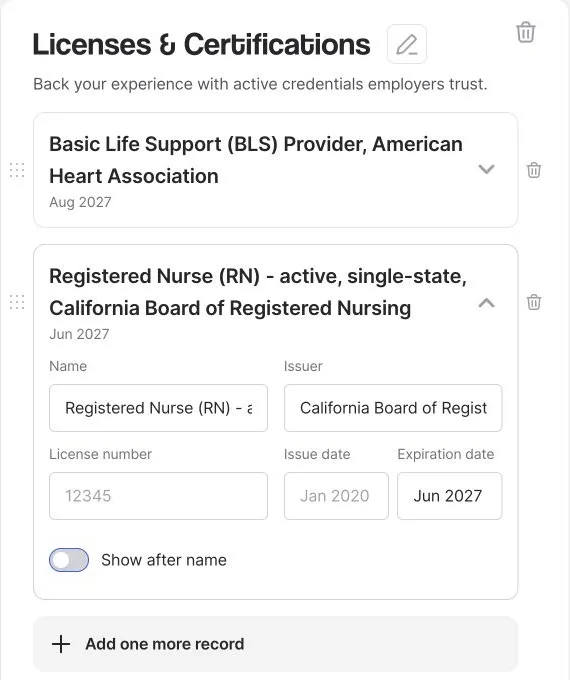
Actual Resume.co editor with fictional data. The RN record is expanded; the BLS record is above it. The gray number and issue date are empty-field placeholders, not Avery's credentials.
Check the result in the preview
The form also offers Show after name. Leave it off for these entries: this example already uses the short header “Avery Lane, BSN, RN,” and the detailed license label does not belong after the name. Keep the BSN degree in Education, and do not add the scheduled ACLS course as an earned certification.
Check that both records appear under Licenses & Certifications, with the right issuer and date attached to each. In the template used for this demonstration, the date appears beside the record without the word “expires,” so review the presentation rather than assuming the field label will carry through. Check the downloaded file before sending it; entering a credential in the builder does not verify its validity.

The same fictional BLS and RN entries in Resume.co's document preview. This crop shows only Licenses & Certifications; the dates are the expiration dates entered above.
Adjust the section to your situation
You graduated but your RN license has not been issued
List the earned degree in Education. Describe an application or scheduled exam only at its actual stage, for example “NCLEX-RN scheduled for November 2026” if that is true. Do not place RN after your name as though licensure were already established. Check the relevant board for any permitted graduate-nurse designation; do not assume that terminology is interchangeable across states.
You hold a multistate license
Name the issuing state and the verified multistate status. Do not relabel it “licensed in all 50 states.” NCSBN explains that eligible nurses with a multistate license can practice in other compact states under the compact; confirm the requirements for the place you intend to work. NCSBN guidance.
A credential has expired or renewal is underway
Do not present it as current. Check the record before changing the status, and make any relevant expiration or renewal information explicit. Applying for renewal does not justify silently extending a date in your resume. Whether an expired qualification is worth mentioning depends on the application; it cannot stand in for a current requirement.
Check the vacancy against your records
Use a small comparison before sending the resume. This is a fictional requirement list for Avery, not a real employer's posting.
Vacancy asks for | Avery's source record | What to do |
|---|---|---|
Current California RN license | Active California single-state RN license | Show the verified license details |
Current AHA BLS | BLS Provider card valid through August 2027 | List the name, issuer, and expiration |
Current ACLS | Course scheduled, not completed | Do not claim the requirement is met; clarify timing with the employer |
Read whether a qualification is required at application, at hire, or later. When the posting is unclear, ask the employer rather than using optimistic resume wording to bridge the gap.
Put the information into your resume
Whether you use Resume.co's resume builder or another editor, prepare the verified entries first. Then use clearly named sections and check the preview: the issuing body and expiration must stay attached to the right credential. Do not let a short template label decide what qualification you claim.
Before submitting, check:
Every credential after your name has been earned and is appropriate to use.
License status and any multistate wording match the current record.
Each current certification has the correct issuer and dates.
Planned training is visibly separate from completed qualifications.
The downloaded file preserves the labels and dates without awkward breaks.
For broader guidance outside nursing, see how to list certifications on a resume.